Würth Baer Supply Company offers our customers an easy way to pay invoices online via credit card through our linked payment portal at SnapPay.com.
Accessing the Payment Portal
The link to access SnapPay can be found in three places on this website:
- Footer – At the bottom of the left side of the footer, under the Company Information heading, click the Pay Invoices Online link (Instructions appear when you hover over the link).
- Order History – At the top right of the Order History page, click the Pay Invoices Online button.
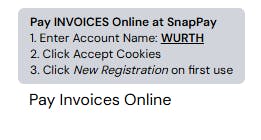
- Click this convenient link to go there directly (opens in a new tab) —> Pay Invoices Online
How To Pay An Invoice (First-Time Use)
The basic steps to pay an invoice are to access the SnapPay portal, fill out the information requested for your invoice and payment and then submit it.
Follow these steps:
- Acquire or have written down the invoice number you will be paying from an invoice you have received or one found in your Order History on the website.
- Click the Pay Invoices Online button or link.
The SnapPay payment portal interface opens. - Click the Accept All cookies link that appears at the bottom of the page. If you do not do this step, you will not be able to continue.
- Type WURTH into the Account Name or Account ID field on the portal.
- Click the New Registration link.
The New User Registration screen appears. - Fill out your address and company information on the User Information section of the form.
Required fields are marked with asterisks "*". - Fill out your Invoice Number and Invoice Amount in the Invoice Details section.
- Select your invoice date from the Invoice Date dropdown field.
- Click the "I am human" captcha box and click the Register button.
- Follow the directions to set a password for your account and make your payment.
How to Pay An Invoice (Already Registered)
Follow these steps:
- Acquire or have written down the invoice number you will be paying from an invoice you have received or one found in your Order History on the website.
- Click the Pay Invoices Online button or link.
The SnapPay payment portal interface opens. - Click the Accept All cookies link that appears at the bottom of the page. If you do not do this step, you will not be able to continue.
- Type WURTH into the Account Name or Account ID field on the portal.
- Enter your User ID and Password on the form.
- Click the "I am human" captcha box and click the Sign In button.
- Follow the directions to enter your Invoice details and make your payment.